
3. How to find a stimulus#
stimupy offers many ways to discover stimulus functions –
whether you’re exploring what’s available or searching for a specific stimulus.
This guide covers both discovery using (this) online documentation
and from within Python discovery methods.
3.1. In this documentation#
3.1.1. Search bar#
If you’re looking for a specific function
or want to check whether stimupy includes a certain stimulus (e.g., Gabors),
use the search bar on any of these pages.
It will return all relevant pages, examples, and API references for your search term.
3.1.2. Overviews of all modules and functions#
You can browse a complete overview of submodules and functions in the stimupy API reference.
This list mirrors stimupy’s modular structure and contains:
All submodules
All functions (with documentation)
Direct links to their definitions
For a more visual approach, explore our interactive demos. These show both high-level and low-level modules, and how they can be used.
3.1.3. Visual overview (coming soon)#
A quick, visual overview of available stimuli will be added in a future update.
3.2. From within Python#
If you’re already working in Python
and simply need to refresh your memory about a submodule or function name,
stimupy provides built-in tools to help.
3.2.1. Visual overviews#
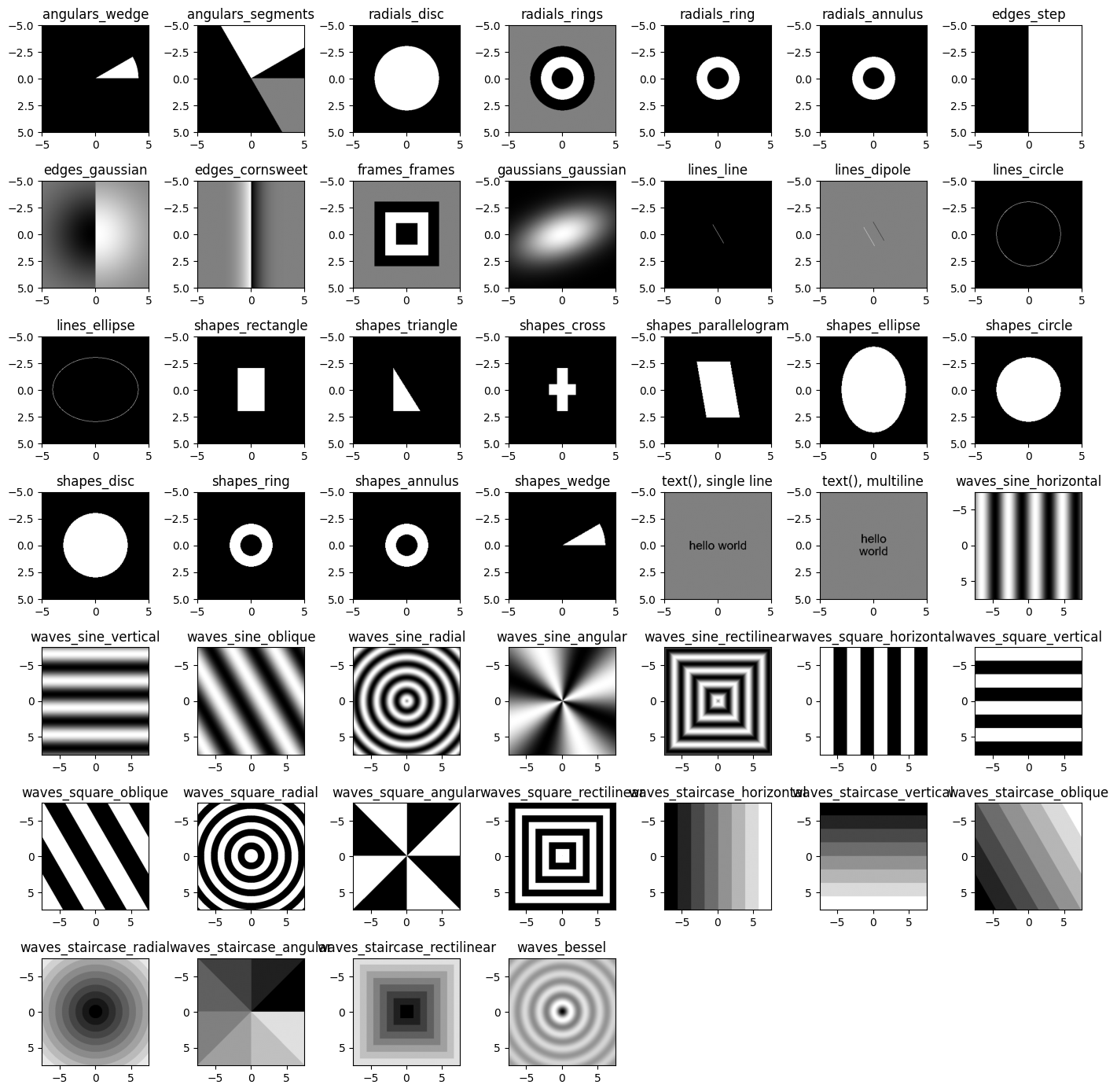
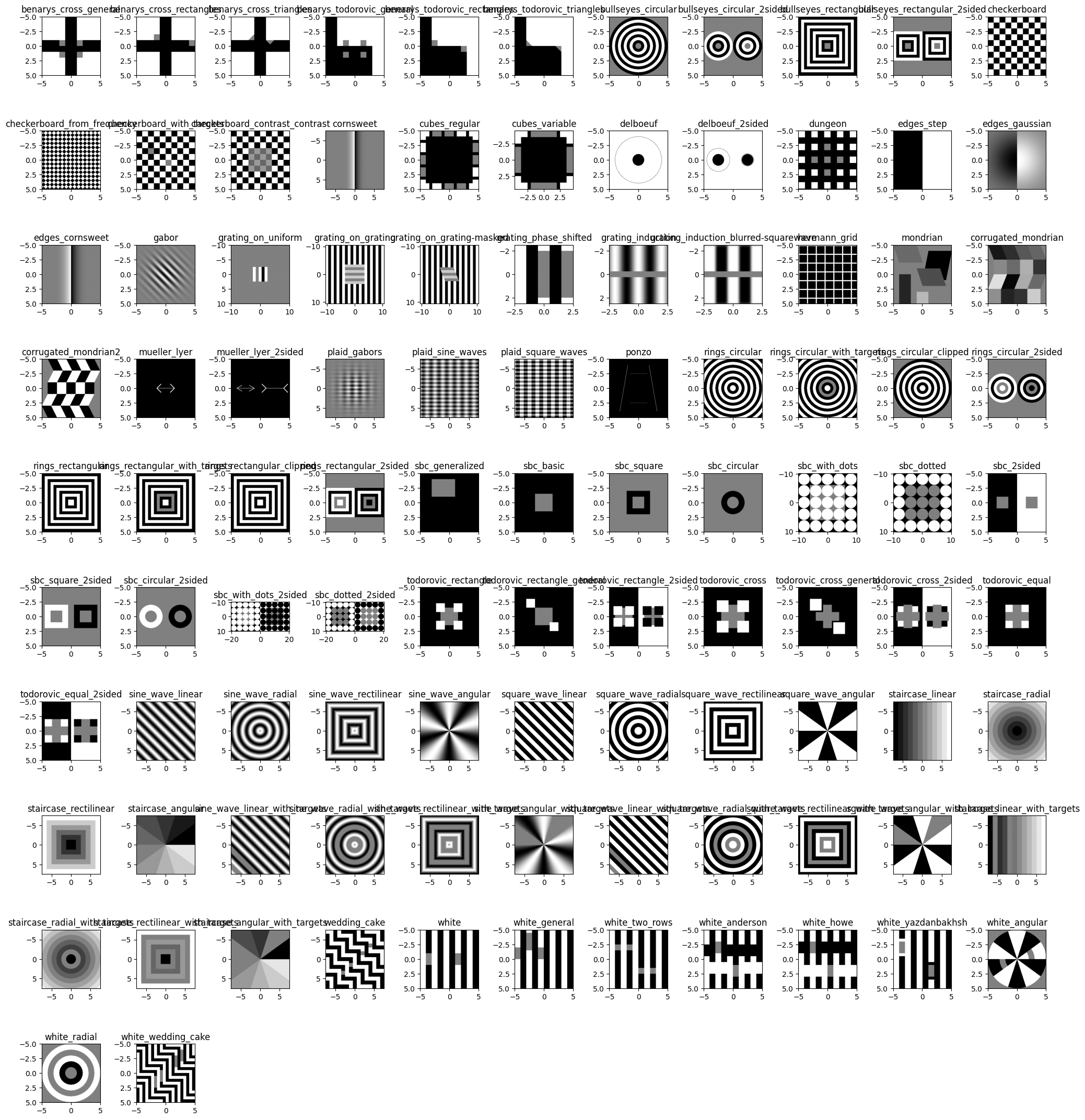
Both stimupy.components and stimupy.stimuli include a plot_overview() function
that displays an example of each available stimulus.
Example for components:
from stimupy import components

components.plot_overview()
Example for stimuli:
from stimupy import stimuli

stimuli.plot_overview()
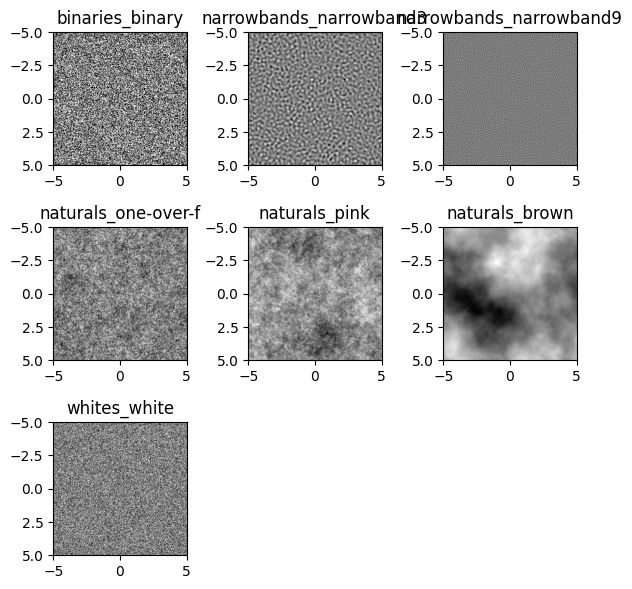
Example for noises:
from stimupy import noises

noises.plot_overview()
3.2.2. Autocompletion in interactive interpreters#
Most consoles and IDEs that you may use (IPython, Jupyter Notebook, Spyder, VSCode, …)
should be able to autocomplete while typing, usually using
>>> stimupy.<TAB>
3.2.3. Using help() to list contents#
You can use Python’s built-in help() function
to inspect submodules, functions, and their documentation.
For modules, this will also list all its submodules and functions.
Top-level overview:
import stimupy

help(stimupy)
Help on package stimupy:

NAME
    stimupy

PACKAGE CONTENTS
    _docs (package)
    components (package)
    logos
    noises (package)
    papers (package)
    stimuli (package)
    utils (package)

SUBMODULES
    benarys
    bullseyes
    checkerboards
    cornsweets
    cubes
    delboeufs
    dungeons
    edges
    gabors
    gratings
    hermanns
    mondrians
    mueller_lyers
    plaids
    ponzos
    rings
    sbcs
    todorovics
    waves
    wedding_cakes
    whites

FUNCTIONS
    mask_targets(element_mask, target_indices)
        Indicate elements as targets

        Creates a new target_mask from a mask of elements (e.g., grating bars, rings, frames, etc.),
        by indexing these elements.

        Parameters
        ----------
        element_mask : numpy.ndarray
            mask with integer values for different elements / regions in a stimulus
        target_indices : Sequence[int] or int
            index or indices of elements to be designated as targets.
            Index 0 should always refer to background region.
            Indices can be negative, which results in "counting backwards"
            from the highest index in element_mask.

        Returns
        -------
        numpy.ndarray
            target mask, with integer values indicating target regions,
            in order that they appear in target_indices

        Raises
        ------
        ValueError
            if a target_idx is greater than any value in the element_mask

    overview(skip=False)
        Generate example stimuli from this module

        Returns
        -------
        dict[str, dict]
            Dict mapping names to individual stimulus dicts

    place_targets(stim, element_mask_key, target_indices, intensity_target=0.5)
        Place targets in stimulus

        Turns image regions/elements defined by element_mask_key
        and indicated by target_indices, into targets.
        Targets are defined in a new target_mask, and drawn into image with intensity_target.

        Parameters
        ----------
        stim : dict[str, Any]
            stimulus dictionary, with at least an "img" key, and mask indicated by element_mask_key
        element_mask_key : str
            key of the mask in stim-dict indicating image "elements"/regions
        target_indices : Sequence[int] or int
            index or indices of elements to be designated as targets
        intensity_target : float, optional
            intensity value for target, by default 0.5

        Returns
        -------
        dict[str, Any]
            dict with the stimulus (key: "img") with targets placed,
            mask with integer index for the target (key: "target_mask")

        See also
        --------
            mask_targets, draw_regions

    plot_overview(mask=False, save=None, units='deg')
        Plot overview of examples in this module (and submodules)

        Parameters
        ----------
        mask : bool or str, optional
            If True, plot mask on top of stimulus image (default: False).
            If string is provided, plot this key from stimulus dictionary as mask
        save : None or str, optional
            If None (default), do not save the plot.
            If string is provided, save plot under this name.
        units : "px", "deg" (default), or str
            what units to put on the axes, by default degrees visual angle ("deg").
            If a str other than "deg"(/"degrees") or "px"(/"pix"/"pixels") is passed,
            it must be the key to a tuple in stim

DATA
    __all__ = ['components', 'noises', 'utils', 'mask_targets', 'place_tar...

VERSION
    1.2.0

FILE
    /home/joris/Research/stimupy/stimupy/__init__.py
High-level submodule:
from stimupy import components

help(components)
Help on package stimupy.components in stimupy:

NAME
    stimupy.components

PACKAGE CONTENTS
    angulars
    edges
    frames
    gaussians
    lines
    radials
    shapes
    texts
    waves

FUNCTIONS
    combine_masks(*masks)
        Combines several masks into a singular mask

        Increments mask-indices, such that the resulting mask contains consecutive integer
        indices.
        Masks are combined in order.

        Parameters
        ----------
        mask_1, mask_2, ... : numpy.ndarray
            Masks to be combined

        Returns
        -------
        numpy.ndarray
            Combined mask, where integer indices are in order of the input masks.

        Raises
        ------
        ValueError
            if masks do not all have the same shape (in pixels)
        ValueError
            if multiple masks index the same pixel

    draw_regions(mask, intensities, intensity_background=0.5)
        Draw regions defined by mask, with given intensities

        Parameters
        ----------
        mask : numpy.ndarray
            image-array with integer-indices for each region to draw
        intensities : Sequence[float, ...]
            intensity value for each masked region.
            Can specify as many intensities as number of masked regions;
            If fewer intensities are passed than masked regions, cycles through intensities
        intensity_background : float, optional
            intensity value of background, by default 0.5

        Returns
        -------
        numpy.ndarray
            image-array, same shape as mask, with intensity assigned to each masked region

    image_base(visual_size=None, shape=None, ppd=None, rotation=0.0, origin='mean')
        Create coordinate-arrays to serve as image base for drawing

        Parameters
        ----------
        visual_size : Sequence[Number, Number], Number, or None (default)
            visual size [height, width] of image, in degrees
        ppd : Sequence[Number, Number], Number, or None (default)
            pixels per degree [vertical, horizontal]
        shape : Sequence[Number, Number], Number, or None (default)
            shape [height, width] of image, in pixels
        rotation : float, optional
            rotation (in degrees) from 3 o'clock, counterclockwise, by default 0.0
        origin : "corner", "mean" or "center"
            if "corner": set origin to upper left corner
            if "mean": set origin to hypothetical image center (default)
            if "center": set origin to real center (closest existing value to mean)

        Returns
        -------
        dict[str, Any]
            dict with keys:
            "visual_size", "ppd" : resolved from input arguments,
            "x", "y" : single axes
            "horizontal", "vertical" : numpy.ndarray of shape, with distance from origin,
            in deg. visual angle, at each pixel
            "oblique", "oblique_y" : numpy.ndarray of shape, with oblique distances from origin,
            in deg. visual angle, at each pixel
            "radial" : numpyn.ndarray of shape, with radius from origin,
            in deg. visual angle, at each pixel
            "angular" : numpy.ndarray of shape, with angle relative to 3 o'clock,
            in rad, at each pixel
            "rectilinear" : numpy.ndarray of shape, with rectilinear/cityblock/Manhattan distance from origin,
            in deg. visual angle, at each pixel

    mask_regions(
        distance_metric,
        edges,
        shape=None,
        visual_size=None,
        ppd=None,
        rotation=0.0,
        origin=None
    )
        Generate mask for regions in image

        Regions are defined by `edges` along a `distance_metric`.
        Regions will be masked consecutively, from `origin` outwards,
        such that each `edge` is the upper-limit of a region.

        Parameters
        ----------
        distance_metric : any of keys in stimupy.components.image_base()
            which distance metric to mask over
        edges : Sequence[Number]
            upper-limit of each consecutive region
        visual_size : Sequence[Number, Number], Number, or None (default)
            visual size [height, width] of image, in degrees
        ppd : Sequence[Number, Number], Number, or None (default)
            pixels per degree [vertical, horizontal]
        shape : Sequence[Number, Number], Number, or None (default)
            shape [height, width] of image, in pixels
        rotation : float, optional
            rotation (in degrees) from 3 o'clock, counterclockwise, by default 0.0
        origin : "corner", "mean" or "center"
            if "corner": set origin to upper left corner
            if "mean": set origin to hypothetical image center (default)
            if "center": set origin to real center (closest existing value to mean)

        Returns
        -------
        dict[str, Any]
            mask with integer index for each angular segment (key: "mask"),
            and additional keys containing stimulus parameters

    overview(skip=False)
        Generate example stimuli from this module

        Returns
        -------
        dict[str, dict]
            Dict mapping names to individual stimulus dicts

    plot_overview(mask=False, save=None, units='deg')
        Plot overview of examples in this module (and submodules)

        Parameters
        ----------
        mask : bool or str, optional
            If True, plot mask on top of stimulus image (default: False).
            If string is provided, plot this key from stimulus dictionary as mask
        save : None or str, optional
            If None (default), do not save the plot.
            If string is provided, save plot under this name.
        units : "px", "deg" (default), or str
            what units to put on the axes, by default degrees visual angle ("deg").
            If a str other than "deg"(/"degrees") or "px"(/"pix"/"pixels") is passed,
            it must be the key to a tuple in stim

DATA
    __all__ = ['overview', 'plot_overview', 'image_base', 'draw_regions', ...

FILE
    /home/joris/Research/stimupy/stimupy/components/__init__.py
Low-level submodule:
from stimupy.components import shapes

help(shapes)
Help on module stimupy.components.shapes in stimupy.components:

NAME
    stimupy.components.shapes

FUNCTIONS
    annulus = ring(
        visual_size=None,
        ppd=None,
        shape=None,
        radii=None,
        intensity_ring=1.0,
        intensity_background=0.0,
        origin='mean'
    )
        Draw a ring (annulus)

        Parameters
        ----------
        visual_size : Sequence[Number, Number], Number, or None (default)
            visual size [height, width] of image, in degrees
        ppd : Sequence[Number, Number], Number, or None (default)
            pixels per degree [vertical, horizontal]
        shape : Sequence[Number, Number], Number, or None (default)
            shape [height, width] of image, in pixels
        radii : Sequence[Number, Number]
            inner and outer radius of ring in degree visual angle
        intensity_ring : Number, optional
            intensity value of ring, by default 1.0
        intensity_background : float, optional
            intensity value of background, by default 0.0
        origin : "corner", "mean" or "center", optional
            if "corner": set origin to upper left corner
            if "mean": set origin to hypothetical image center (default)
            if "center": set origin to real center (closest existing value to mean)

        Returns
        -------
        dict[str, Any]
            dict with the stimulus (key: "img"),
            mask with integer index for each ring (key: "ring_mask"),
            and additional keys containing stimulus parameters

        Raises
        ------
        ValueError
            if passed in less/more than 2 radii (inner, outer)
        ValueError
            if passed in less/more than 1 intensity

    circle(
        visual_size=None,
        ppd=None,
        shape=None,
        radius=None,
        intensity_circle=1.0,
        intensity_background=0.0,
        origin='mean',
        restrict_size=True
    )
        Draw an ellipse

        Parameters
        ----------
        visual_size : Sequence[Number, Number], Number, or None (default)
            visual size [height, width] of image, in degrees visual angle
        ppd : Sequence[Number, Number], Number, or None (default)
            pixels per degree [vertical, horizontal]
        shape : Sequence[Number, Number], Number, or None (default)
            shape [height, width] of image, in pixels
        radius : Number or None (default)
            circle radius in degrees visual angle
        intensity_circle : float, optional
            intensity value for circle, by default 1.0
        intensity_background : float, optional
            intensity value of background, by default 0.0
        origin : "corner", "mean" or "center"
            if "corner": set origin to upper left corner
            if "mean": set origin to hypothetical image center (default)
            if "center": set origin to real center (closest existing value to mean)
        restrict_size : Bool
            if False, allow circle to reach beyond image size (default: True)

        Returns
        ----------
        dict[str, Any]
            dict with the stimulus (key: "img"),
            mask with integer index for the shape (key: "circle_mask"),
            and additional keys containing stimulus parameters

    cross(
        visual_size=None,
        ppd=None,
        shape=None,
        cross_size=None,
        cross_thickness=None,
        cross_arm_ratios=(1.0, 1.0),
        intensity_cross=1.0,
        intensity_background=0.0,
        rotation=0.0
    )
        Draw a cross

        Parameters
        ----------
        visual_size : Sequence[Number, Number], Number, or None (default)
            visual size [height, width] of image, in degrees visual angle
        ppd : Sequence[Number, Number], Number, or None (default)
            pixels per degree [vertical, horizontal]
        shape : Sequence[Number, Number], Number, or None (default)
            shape [height, width] of image, in pixels
        cross_size : Number, Sequence[Number, Number]
            cross size [height, width], in degrees visual angle
        cross_thickness : Number, Sequence[Number, Number]
            thickness of cross in degrees visual angle
        cross_arm_ratios : float or (float, float)
            ratio used to create arms (up-down, left-right)
        intensity_cross: float, optional
            intensity value for cross, by default 1.0
        intensity_background : float, optional
            intensity value of background, by default 0.0
        rotation : float, optional
            rotation (in degrees), counterclockwise, by default 0.0

        Returns
        -------
        dict[str, Any]
            dict with the stimulus (key: "img"),
            mask with integer index for the shape (key: "cross_mask"),
            and additional keys containing stimulus parameters

    disc(
        visual_size=None,
        ppd=None,
        shape=None,
        radius=None,
        intensity_disc=1.0,
        intensity_background=0.0,
        origin='mean'
    )
        Draw a central disc

        Essentially, `dics(radius)` is an alias for `ring(radii=[0, radius])`

        Parameters
        ----------
        visual_size : Sequence[Number, Number], Number, or None (default)
            visual size [height, width] of image, in degrees
        ppd : Sequence[Number, Number], Number, or None (default)
            pixels per degree [vertical, horizontal]
        shape : Sequence[Number, Number], Number, or None (default)
            shape [height, width] of image, in pixels
        radius : Number
            outer radius of disc in degree visual angle
        intensity_disc : Number, optional
            intensity value of disc, by default 1.0
        intensity_background : float, optional
            intensity value of background, by default 0.0
        origin : "corner", "mean" or "center", optional
            if "corner": set origin to upper left corner
            if "mean": set origin to hypothetical image center (default)
            if "center": set origin to real center (closest existing value to mean)

        Returns
        -------
        dict[str, Any]
            dict with the stimulus (key: "img"),
            mask with integer index for each ring (key: "ring_mask"),
            and additional keys containing stimulus parameters

    ellipse(
        visual_size=None,
        ppd=None,
        shape=None,
        radius=None,
        intensity_ellipse=1.0,
        intensity_background=0.0,
        rotation=0.0,
        origin='mean',
        restrict_size=True
    )
        Draw an ellipse

        Parameters
        ----------
        visual_size : Sequence[Number, Number], Number, or None (default)
            visual size [height, width] of image, in degrees visual angle
        ppd : Sequence[Number, Number], Number, or None (default)
            pixels per degree [vertical, horizontal]
        shape : Sequence[Number, Number], Number, or None (default)
            shape [height, width] of image, in pixels
        radius : Sequence[Number, Number], Number or None (default)
            ellipse radius [ry, rx] in degrees visual angle
        intensity_ellipse : float, optional
            intensity value for ellipse, by default 1.0
        intensity_background : float, optional
            intensity value of background, by default 0.0
        rotation : float, optional
            rotation (in degrees), counterclockwise, by default 0.0
        origin : "corner", "mean" or "center"
            if "corner": set origin to upper left corner
            if "mean": set origin to hypothetical image center (default)
            if "center": set origin to real center (closest existing value to mean)
        restrict_size : Bool
            if False, allow ellipse to reach beyond image size (default: True)

        Returns
        -------
        dict[str, Any]
            dict with the stimulus (key: "img"),
            mask with integer index for the shape (key: "ellipse_mask"),
            and additional keys containing stimulus parameters

    parallelogram(
        visual_size=None,
        ppd=None,
        shape=None,
        parallelogram_size=None,
        intensity_parallelogram=1.0,
        intensity_background=0.0,
        rotation=0.0
    )
        Draw a parallelogram

        Parameters
        ----------
        visual_size : Sequence[Number, Number], Number, or None (default)
            visual size [height, width] of image, in degrees visual angle
        ppd : Sequence[Number, Number], Number, or None (default)
            pixels per degree [vertical, horizontal]
        shape : Sequence[Number, Number], Number, or None (default)
            shape [height, width] of image, in pixels
        parallelogram_size : [Number, Number, Number], [Number, Number], Number or None (default)
            parallelogram size [height, width, depth], in degrees visual angle
        intensity_parallelogram : float, optional
            intensity value for parallelogram, by default 1.0
        intensity_background : float, optional
            intensity value of background, by default 0.0
        rotation : float, optional
            rotation (in degrees), counterclockwise, by default 0.0

        Returns
        -------
        dict[str, Any]
            dict with the stimulus (key: "img"),
            mask with integer index for the shape (key: "parallelogram_mask"),
            and additional keys containing stimulus parameters

    rectangle(
        visual_size=None,
        ppd=None,
        shape=None,
        rectangle_size=None,
        rectangle_position=None,
        intensity_rectangle=1.0,
        intensity_background=0.0,
        rotation=0.0
    )
        Draw a rectangle

        Parameters
        ----------
        visual_size : Sequence[Number, Number], Number, or None (default)
            visual size [height, width] of image, in degrees visual angle
        ppd : Sequence[Number, Number], Number, or None (default)
            pixels per degree [vertical, horizontal]
        shape : Sequence[Number, Number], Number, or None (default)
            shape [height, width] of image, in pixels
        rectangle_size : Number, Sequence[Number, Number]
            rectangle size [height, width], in degrees visual angle
        rectangle_position : Number, Sequence[Number, Number], or None (default)
            position of the rectangle, in degrees visual angle.
            If None, rectangle will be placed in center of image.
        intensity_rectangle : float, optional
            intensity value for rectangle, by default 1.0
        intensity_background : float, optional
            intensity value of background, by default 0.0
        rotation : float, optional
            rotation (in degrees), counterclockwise, by default 0.0 (horizontal)

        Returns
        -------
        dict[str, Any]
            dict with the stimulus (key: "img"),
            mask with integer index for the shape (key: "rectangle_mask"),
            and additional keys containing stimulus parameters

    ring(
        visual_size=None,
        ppd=None,
        shape=None,
        radii=None,
        intensity_ring=1.0,
        intensity_background=0.0,
        origin='mean'
    )
        Draw a ring (annulus)

        Parameters
        ----------
        visual_size : Sequence[Number, Number], Number, or None (default)
            visual size [height, width] of image, in degrees
        ppd : Sequence[Number, Number], Number, or None (default)
            pixels per degree [vertical, horizontal]
        shape : Sequence[Number, Number], Number, or None (default)
            shape [height, width] of image, in pixels
        radii : Sequence[Number, Number]
            inner and outer radius of ring in degree visual angle
        intensity_ring : Number, optional
            intensity value of ring, by default 1.0
        intensity_background : float, optional
            intensity value of background, by default 0.0
        origin : "corner", "mean" or "center", optional
            if "corner": set origin to upper left corner
            if "mean": set origin to hypothetical image center (default)
            if "center": set origin to real center (closest existing value to mean)

        Returns
        -------
        dict[str, Any]
            dict with the stimulus (key: "img"),
            mask with integer index for each ring (key: "ring_mask"),
            and additional keys containing stimulus parameters

        Raises
        ------
        ValueError
            if passed in less/more than 2 radii (inner, outer)
        ValueError
            if passed in less/more than 1 intensity

    triangle(
        visual_size=None,
        ppd=None,
        shape=None,
        triangle_size=None,
        intensity_triangle=1.0,
        intensity_background=0.0,
        include_corners=True,
        rotation=0.0
    )
        Draw a triangle

        Parameters
        ----------
        visual_size : Sequence[Number, Number], Number, or None (default)
            visual size [height, width] of image, in degrees visual angle
        ppd : Sequence[Number, Number], Number, or None (default)
            pixels per degree [vertical, horizontal]
        shape : Sequence[Number, Number], Number, or None (default)
            shape [height, width] of image, in pixels
        triangle_size : Number, Sequence[Number, Number]
            triangle size [height width], in degrees visual angle
        intensity_triangle : float, optional
            intensity value for triangle, by default 1.0
        intensity_background : float, optional
            intensity value of background, by default 0.0
        rotation : float, optional
            rotation (in degrees), counterclockwise, by default 0.0

        Returns
        -------
        dict[str, Any]
            dict with the stimulus (key: "img"),
            mask with integer index for the shape (key: "triangle_mask"),
            and additional keys containing stimulus parameters

    wedge(
        visual_size=None,
        ppd=None,
        shape=None,
        angle=None,
        radius=None,
        rotation=0.0,
        inner_radius=0.0,
        intensity_wedge=1.0,
        intensity_background=0.0,
        origin='mean'
    )
        Draw a wedge, i.e., segment of a disc

        Parameters
        ----------
        visual_size : Sequence[Number, Number], Number, or None (default)
            visual size [height, width] of image, in degrees
        ppd : Sequence[Number, Number], Number, or None (default)
            pixels per degree [vertical, horizontal]
        shape : Sequence[Number, Number], Number, or None (default)
            shape [height, width] of image, in pixels
        angle : float
            angular-width (in degrees) of segment
        radius : float
            radius of disc, in degrees visual angle
        rotation : float, optional
            rotation (in degrees) from 3 o'clock, counterclockwise, by default 0.0
        inner_radius : float, optional
            inner radius (in degrees visual angle), to turn disc into a ring, by default 0
        intensity_wedge : float, optional
            intensity value of wedge, by default 1.0
        intensity_background : float, optional
            intensity value of background, by default 0.0
        origin : "corner", "mean" or "center"
            if "corner": set origin to upper left corner
            if "mean": set origin to hypothetical image center (default)
            if "center": set origin to real center (closest existing value to mean)

        Returns
        -------
        dict[str, Any]
            dict with the stimulus (key: "img"),
            mask with integer index for each segment (key: "wedge_mask"),
            and additional keys containing stimulus parameters

DATA
    __all__ = ['rectangle', 'triangle', 'cross', 'parallelogram', 'ellipse...

FILE
    /home/joris/Research/stimupy/stimupy/components/shapes.py
3.3. How stimupy is organized#
3.3.1. High-level submodules#
The stimupy library is organized into several high-level submodules,
each reflecting a different aspect of visual stimulus generation.
These include:
Components — basic building blocks such as geometric shapes, gratings, Gaussians, and lines
Noises — noise textures like binary, white, pink, brown, and narrowband noise
Stimuli — complete visual stimuli such as Gabors, plaids, Mondrians, and various visual illusions (e.g., Simultaneous Brightness Contrast, White’s illusion, Hermann grid, Ponzo illusion)
Papers — published stimulus sets which are exact replications of stimuli described in specific papers (e.g., ModelFest)
Utils — a variety of utility functions for stimulus import/export, manipulation (e.g., contrast, size, padding), exploration of parameter spaces, plotting, etc
You can import entire submodules via, e.g.:
from stimupy import stimuli
3.3.2. Low-level submodules (sub-submodules)#
stimupy is further subdivided into many lower-level submodules.
The structure of these submodules reflects scientific conventions and conceptual similarities
rather than strict software engineering practices.
This means that stimuli are grouped with others that look similar or are conceptually related,
even if they don’t share underlying code (although these two criteria can overlap, of course).
All submodule names are pluralized –
for example, sbcs for Simultaneous Brightness ContrastS,
and cubes for cube illusions.
This naming avoids namespace conflicts:
from stimupy.stimuli import cubesrefers to thecubessubmodule ofstimulifrom stimupy.stimuli.cubes import cuberefers to a specific function of the sub-submodulecubes
Pluralized names also hint that a given category may contain multiple variations or implementations.
3.3.3. Multiple Approaches to the Same Stimulus#
All roads lead to Rome, and many ways lead to the same stimulus.
Many stimupy stimuli can be constructed in more than one way,
reflecting different visual or geometric interpretations.
For example, the Todorovic Illusion can be seen either as:
a rectangle occluded by covers (
todorovics.rectangle), ora cross-shaped target with adjacent squares (
todorovics.cross)
For some parameters, these two views may produce visually identical images. However, when parameters change, their behaviors diverge – demonstrating how interpretation shapes construction.
For more detail, see ./stimuli_parametrizations.
To explore how different functions behave, we recommend trying the interactive demos.
3.3.4. The philosophy behind components vs. stimuli#
You might ask: What’s the difference between a component and a stimulus?
Truthfully, the line is not always clear.
Conceptually, every component could be used as a stimulus, and vice versa.
However, the distinction reflects a guiding principle of stimupys modularity:
componentscan be considered as atomic elements – reusable functions that serve as building blocks across many different stimulus functionsstimuliare typically higher-level constructs, often featuring target regions and providingtarget_masksfor region-specific analysis or manipulation
This modular structure allows for easy addition of entirely new stimulus functions or stimulus variations.
But do not worry. If this differentiation is not useful to you,
all components are also imported directly via the stimuli namespace, such that:
from stimupy.stimuli import ponzos, shapes
This flexibility supports both modular use and simplified workflows.