
Visual Noise#
Tip
This guide covers the concept, usage, and customization of visual noise patterns in stimupy.
For hands-on demonstrations of how parameters affect different noise types, see the noise demos [e.g.this. For a high-level summary, refer to the noise overview.
Why Use Noise?#
Visual noise patterns are useful in a wide range of experimental and applied vision science contexts, including:
Simulating natural textures for perceptual experiments.
Creating masking stimuli to control visibility of a target.
Generating backgrounds for psychophysical tasks.
Studying spatial frequency and contrast sensitivity.
Noise is not just “randomness” — different noise types (e.g., white, pink, brown) have distinct spectral characteristics that make them suitable for specific purposes.
In the following, we will look at some examples that demonstrate how you can use stimupy to generate noise-stimuli, and discuss some overarching considerations.´
Example: Generating a Noise Background#
In this example, we will create a pink noise stimulus, e.g. to use it as the background in an experiment. Along the way, we will cover key considerations when working with noise in stimupy or in vision science in general.
The relevant function is:
from stimupy.noises.naturals import pink
help(pink)
Help on function pink in module stimupy.noises.naturals:

pink(
    visual_size=None,
    ppd=None,
    shape=None,
    intensity_range=(0, 1),
    pseudo_noise=False,
    rng=None
)
    Draw pink (1 / f) noise texture

    Parameters
    ----------
    visual_size : Sequence[Number, Number], Number, or None (default)
        visual size [height, width] of grating, in degrees
    ppd : Sequence[Number, Number], Number, or None (default)
        pixels per degree [vertical, horizontal]
    shape : Sequence[Number, Number], Number, or None (default)
        shape [height, width] of grating, in pixels
    intensity_range : Sequence[Number, Number]
        minimum and maximum intensity value; default: (0, 1).
        be aware that not every instance has mean=(max-min)/2.
    pseudo_noise : bool
        if True, generate pseudo-random noise with ideal power spectrum
    rng : numpy.random.Generator, optional
        Random number generator to use. If None, a new default_rng is created.
        By passing in a custom rng, you can control the randomness of the noise generation,
        e.g., make it replicable.

    Returns
    -------
    A stimulus dictionary with the noise array ['img']
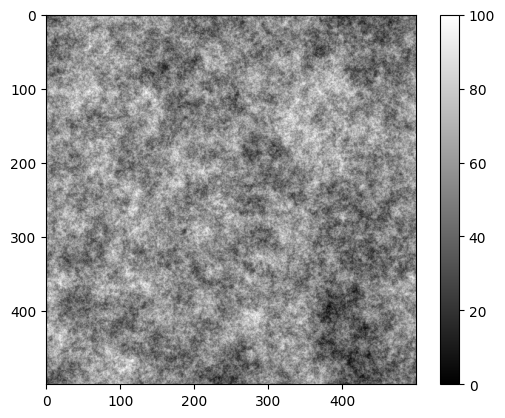
As with other stimupy stimuli, you can provide the visual size and pixels-per-degree (ppd) to adjust stimulus size. Another important parameter is intensity_range, which defines the minimum and maximum luminance (or pixel values) of the generated noise.
For example, here we set the luminance range to [0, 100] cd/m²:
import matplotlib.pyplot as plt

stim = pink(visual_size=10, ppd=50, intensity_range=[0, 100])
plt.imshow(stim["img"], cmap="gray")
plt.colorbar()
plt.show()
Understanding intensity_range#
We use intensity_range for both noise and other stimuli to maintain a neutral, flexible definition.
However, note:
The
intensity_rangeonly sets minimum and maximum possible values.The actual mean luminance of the noise will vary because the pixel values are randomly distributed.
It is not guaranteed that the mean will be exactly halfway between the min and max.
Example:
print("Mean intensity = %.3f" % stim["img"].mean())
Mean intensity = 54.219
Controlling Mean Intensity and Contrast#
For many experiments, you may want the mean luminance and contrast of your noise to be precisely defined.
The most common contrast measure is root-mean-square (RMS) contrast or normalized RMS contrast, i.e. RMS contrast divided by mean luminance.
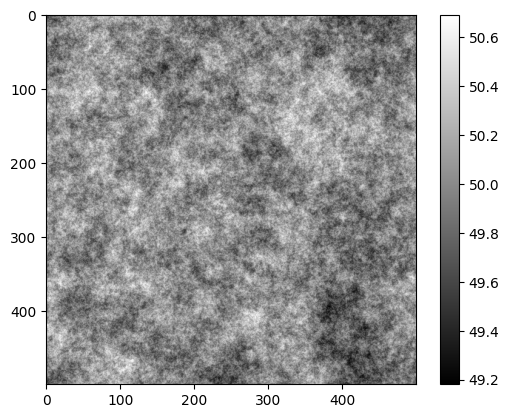
stimupy provides utility functions for adjusting a stimulus’ mean and RMS contrast directly. Let’s look at how they change the noise pattern.
from stimupy.utils.contrast_conversions import adapt_rms_contrast_dict

stim = adapt_rms_contrast_dict(
    stim=stim,
    rms_contrast=0.2,     # target RMS contrast
    mean_luminance=50     # target mean luminance in cd/m²
)

print("Mean intensity = %.3f" % stim["img"].mean())
print("RMS contrast = %.3f" % stim["img"].std())

plt.imshow(stim["img"], cmap="gray")
plt.colorbar()
plt.show()
Mean intensity = 50.000
RMS contrast = 0.200
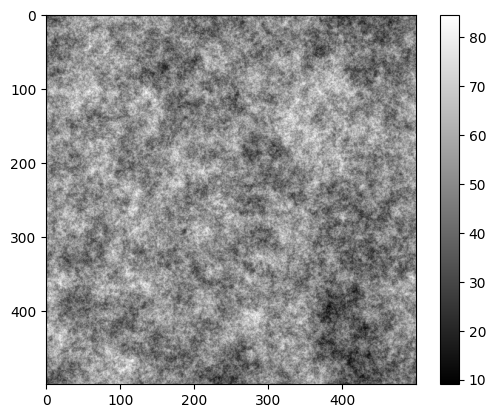
or alternatively, the normalized RMS-contrast:
from stimupy.utils.contrast_conversions import adapt_normalized_rms_contrast_dict

stim = adapt_normalized_rms_contrast_dict(
    stim=stim,
    rms_contrast=0.2,     # target RMS contrast
    mean_luminance=50     # target mean luminance in cd/m2
)

print("Mean intensity = %.3f" % stim["img"].mean())
print("Normalized RMS contrast = %.3f" % (stim["img"].std() / stim["img"].mean()))

plt.imshow(stim["img"], cmap="gray")
plt.colorbar()
plt.show()
Mean intensity = 50.000
Normalized RMS contrast = 0.200
Key Takeaways:
intensity_rangesets only the allowable min/max pixel values.Use
adapt_rms_contrast_dict(or similar functions) to ensure precise control over mean luminance and contrast.Different noise types will have different spectral properties—choose based on your experimental needs.